
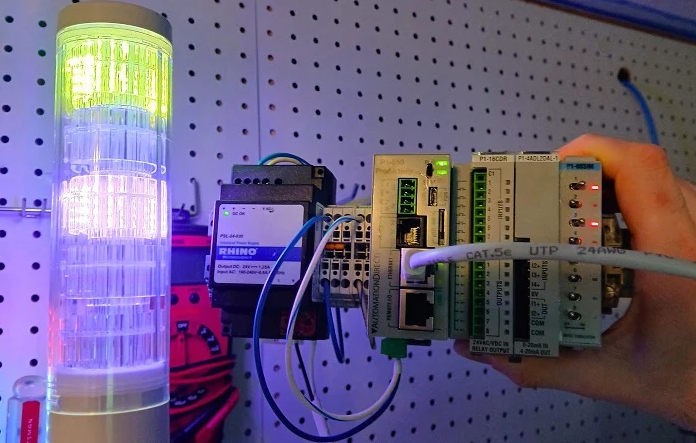
Master Modbus TCP Implementation: A Practical Guide to Industrial Device Integration
Industrial automation professionals often share a complicated relationship with legacy protocols. Modbus TCP stands as a prime example. While it lacks the modern plug-and-play convenience of EtherNet/IP or PROFINET, its ubiquity in factory automation remains unchallenged. Understanding how to navigate its register-based structure is essential for any control systems engineer.
The Architectural Shift: Modbus TCP vs. Modern Industrial Protocols
The primary distinction between Modbus and contemporary protocols like EtherNet/IP involves data consistency and configuration overhead. Most modern Ethernet-based protocols are dynamic. They require Electronic Data Sheets (EDS) or specific hardware profiles to define data assembly instances. These profiles tell the controller exactly how many bytes to expect for input, output, and configuration.
In contrast, Modbus TCP operates with fixed expectations. It relies on a functional simplicity that eliminates the need for complex device profiles. You do not “install” a Modbus device into a PLC project hardware tree in the traditional sense. Instead, you simply directed a command to an IP address using a specific function code and starting register.
Preparing the Hardware: Gateway and IP Configuration
Before executing logic, you must establish the physical and network foundation. Using a 5-segment stack light (such as the Patlite LA6-LAN) as a reference, the first step involves accessing the device’s internal web server. Most industrial devices ship with a default static IP, often in the 192.168.X.X range.
You must align the device IP address with the subnet of your PLC or DCS. For Modbus TCP, the standard communication port is 502. Ensure this port is enabled within the device security settings. Unlike complex fieldbus systems, if you can “ping” the device from your workstation, you are generally ready to begin messaging.
Decoding Function Codes and Register Mapping
The most significant hurdle in Modbus integration is the abstraction of data. Since Modbus does not inherently understand “colors” or “flashing patterns,” it uses 16-bit integers to represent these states. To control a device, you must answer two critical questions found in the manufacturer’s manual:
- Which Function Codes are supported? Typically, you will use Code 06 (Write Single Register) or Code 16 (Write Multiple Registers) for command outputs.
- What decimal values trigger specific behaviors?
For example, a stack light might require a specific bitmask to be converted into a decimal integer. If the manual states that the “Control” byte and the “Status” byte must both be set to 01 to turn a light on, the resulting 16-bit binary string (0000 0001 0000 0001) translates to the decimal value 257.
Implementing Logic in AutomationDirect Productivity Suite
In the Productivity Suite environment, communication is handled via the MWX (Modbus Write) instruction. This approach is highly efficient for rapid deployment.
- Tag Assignment: Create integer tags to hold your calculated command values (e.g., 257 for “On”, 256 for “Off”).
- Instruction Setup: Enter the target IP address and select the appropriate function code.
- Polling Strategy: Use a specialized contact or a clock pulse to trigger the rung. An interval of 500 ms is usually sufficient for visual indicators like stack lights without saturating network bandwidth.
Integration within Rockwell Studio 5000 Environments
Integrating Modbus devices into an Allen-Bradley environment requires a slightly different workflow since EtherNet/IP is the native language. Engineers typically utilize a Modbus TCP Client Add-On Instruction (AOI).
Once you import the AOI, the process mirrors the logic used in other platforms. You move (MOV) your integer constants into the Data.HoldRegisters array defined by the AOI. The instruction manages the socket connection and transaction timing. While this adds a layer of software abstraction, it maintains a clean code structure within the Controller Organizer.
Expert Insight: Why Modbus Still Matters in 2026
From a technical perspective, Modbus persists because it is “close to the metal.” It provides a transparent look at how data moves across a wire. While it requires more manual documentation review than a self-configuring I/O link, it offers unparalleled compatibility. Whether you are integrating a high-end Schneider Electric PLC or a low-cost IoT gateway, Modbus remains the universal translator of the industrial world.


No Comments